


Originally published by Seamless Intelligence, with testing conducted in 2021–2023. This is Part 3 of a three-part series. Part 2 walked through the full Sliver attack chain; here we look at detecting it with native Windows logs and Sysmon.
The Sliver attack chain
Following on from Part 2, we'll now dissect a number of valuable detections that can be implemented in any SIEM product using native Windows logs and some Sysmon logs. For Windows logging, you may need to adjust Group Policy to turn on some of the logs used here; it's still disappointing that some of the most valuable Windows logs aren't on by default.
For deploying Sysmon, there are several good guides and configuration options. We used a combination of two Sysmon config files, linked at the end of this article.
For the detections in this article, we'll look at the following phases of the attack. Not all can be detected through logs, and we'll explain why:
- Establish session. This is us executing the beacon, which for Sliver produces limited logs. We don't currently attempt to detect the execution of a Sliver beacon via Windows logs.
- Initial user and domain recon. We didn't mimic an initial access vector; we simply dropped the Sliver beacon to disk and executed it as a low-privileged user.
- Local admin escalation. This particular UAC bypass produces distinct log artefacts we can build high-quality detections on.
- Domain escalation. Kerberoasting is very common as an escalation technique, as it can be attempted in the vast majority of Windows domain environments.
Detection advice
Across this testing, our SOC learnt some valuable lessons about building detections. There are exceptions to all of the guidance below, but it should help.
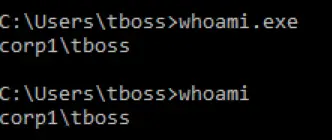
- Don't rely on a single test to create your detection. Don't assume that detecting something once means you have it fully covered. A common example is regular expressions that are too precise: there's a big difference between a log containing whoami.exe and one containing whoami (both work in Windows) if your regex requires the extension, as in whoami\.exe. This cuts both ways: sometimes a precise regex is needed to filter false positives, sometimes a more generic one is needed to capture different ways of executing the same thing.
- Don't rely on a single log field just because it looks unique. Many times we've built what looked like a great detection, only for it to fire thousands of times in the first minutes in production, usually because a field that looked unique in the research environment is extremely common outside it. The named-pipe example in the Establish Session section below is a good example of an "almost-detection".
- Search around the obvious logs for related ones. This can take a detection from false-positive-prone to very accurate. When a process spawns, always look for DLL load events, registry changes or Process Access events in Sysmon, as these may have their own detectable characteristics. Pivoting around the user session is invaluable in domain logs and will often let you directly relate two logs that didn't initially appear related.
- Test every rule in both test and production where possible. We test every rule we can in our research environment and then in every production environment it's deployed to. This uncovers logging irregularities or missing logs before they become a bigger issue.
Establish session detection
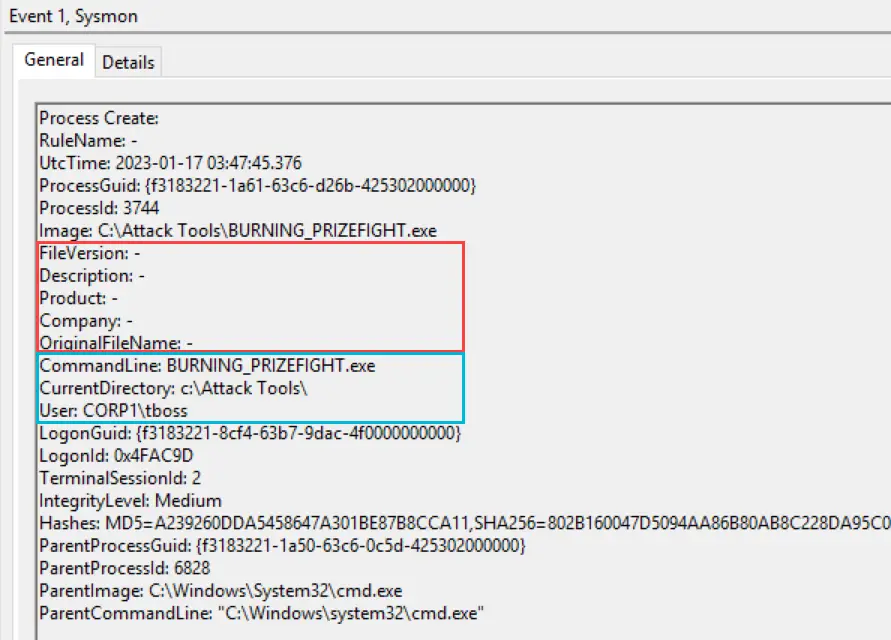
Initial access and beacon execution can happen in many ways. For simplicity, we took a default HTTP Sliver beacon and ran it as a non-admin user to establish the foothold. As the Sysmon process-creation event shows, there are very few distinguishing features to base a detection on:
- Metadata. There's very little default metadata in the Sliver binary. It's not always available, but occasionally you get very specific information such as an author's name or the original filename.
- File hash. The hash for each binary we create is different. It's a good value for later investigation, but unlikely to be usable for initial detection.
- Current directory. Generic rules for execution from Downloads or Outlook folders may catch this, but there's nothing Sliver-specific to detect here.
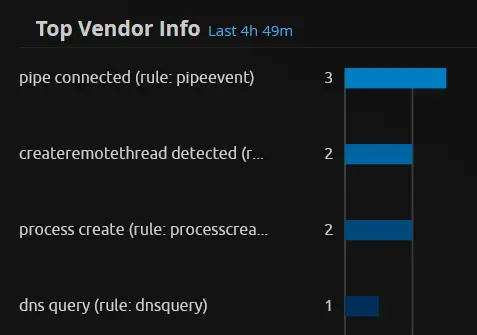
Below are all the logs related to the initial execution of PERFECT_ACCOMPANIST.exe (the Sliver HTTP beacon binary). In total, twelve logs are generated by Sysmon and native Windows logging. The two that stand out are the references to notepad.exe and the named pipe event for \wkssvc.
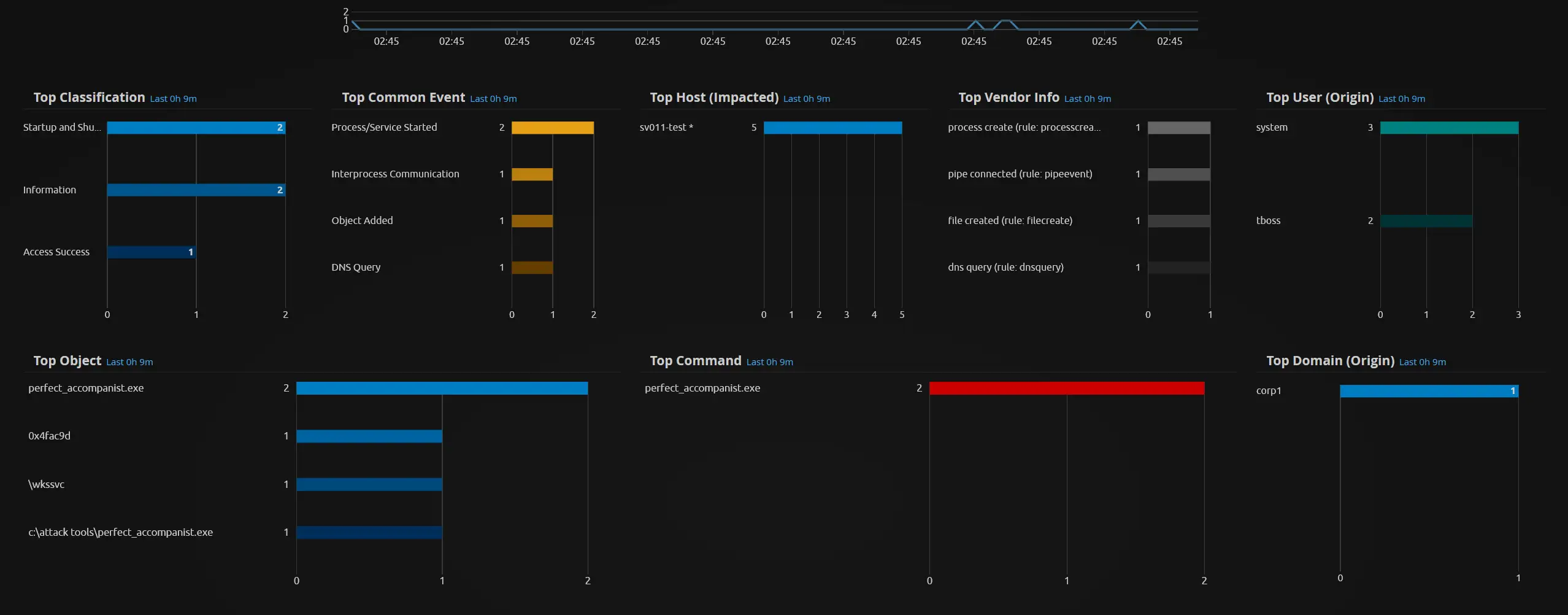
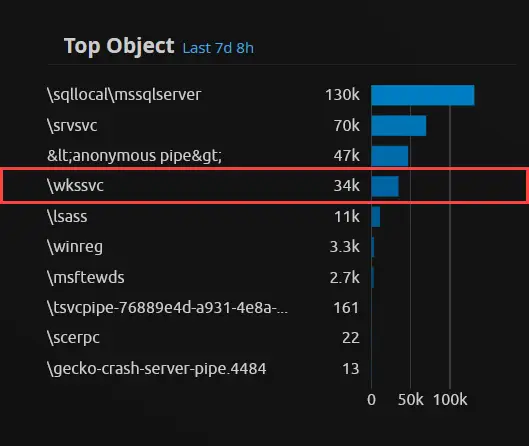
The named pipe looks unique and seems suitable for a detection. But digging in, we find that named pipes called \wkssvc are an almost constant occurrence even in an environment with little to no activity.
We can see there were roughly 34,000 named pipe events with the pipe name \wkssvc, which wouldn't be feasible to alert on. However, the process that creates the named pipe is also in the log, which is something we could use for detections or tuning to get only the events we want.
Unfortunately, a huge variety of processes use this named pipe. Adding tens or hundreds of tuning exclusions to a rule like this isn't ideal, and you end up playing a long-term game of chicken.
Some repositories with code for testing named pipes:
win32-named-pipes-example
github.com/peter-bloomfield/win32-named-pipes-example
Simple example code for working with named pipes in C++ using the Win32 API.
named-pipe-examples
github.com/sovprene/named-pipe-examples
Initial user and domain recon
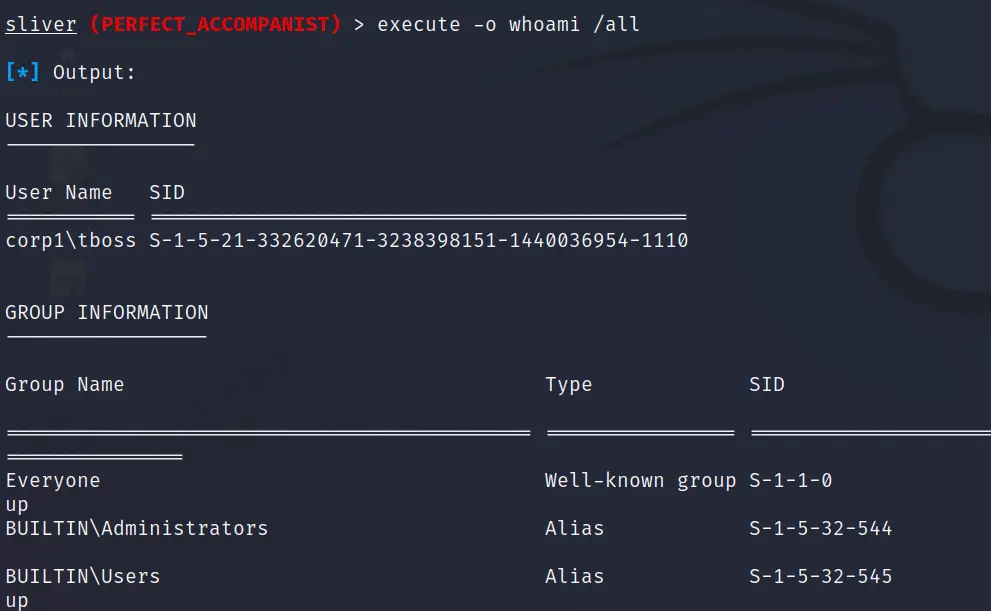
Now we move on to activities that are easier to generate logs for and build detections around. We'll start with a favourite: detecting the use of whoami by any user, as this often gives attackers a good idea of group membership and initial escalation options.
The standard whoami only returns the username, so we'll often see the /all or /priv flags used to get more. That's especially abnormal for a normal user in a non-admin context, denoted by IntegrityLevel = Medium in the log below.
Raw log
<System>
 <Provider Name='Microsoft-Windows-Sysmon'/>
 <EventID>1</EventID>
 <Version>5</Version>
 <Level>Information</Level>
 <Task>Process Create (rule: ProcessCreate)</Task>
 <TimeCreated SystemTime='2023-01-17T07:13:29.799805100Z'/>
 <Computer>sv011-test.corp1.local</Computer>
 <Security UserID='NT AUTHORITY\SYSTEM'/>
</System>
<EventData>
 <Data Name='Image'>C:\Windows\System32\whoami.exe</Data>
 <Data Name='Description'>whoami - displays logged on user information</Data>
 <Data Name='OriginalFileName'>whoami.exe</Data>
 <Data Name='CommandLine'>whoami /all</Data>
 <Data Name='CurrentDirectory'>c:\Attack Tools\</Data>
 <Data Name='User'>CORP1\tboss</Data>
 <Data Name='IntegrityLevel'>Medium</Data>
 <Data Name='ParentImage'>C:\Attack Tools\PERFECT_ACCOMPANIST.exe</Data>
 <Data Name='ParentCommandLine'>PERFECT_ACCOMPANIST.exe</Data>
</EventData>
Detection logic
This is a low-risk detection we can apply to all Windows Security and Sysmon logs. It produces a fair number of false positives for admin users but very few for normal users. An analyst needs to understand what each flag returns. We can also feed this into other rules linked to the same user, such as system and network discovery activity.
Log Source:   Windows Security OR Sysmon
Event ID:     4688 OR 1
CommandLine:  CONTAINS REGEX whoami.*\/
To split the rule into admin and normal-user versions, add one of the following to each:
Mandatory Label:
  Admin        - High
  Normal User  - Medium
Attacker use
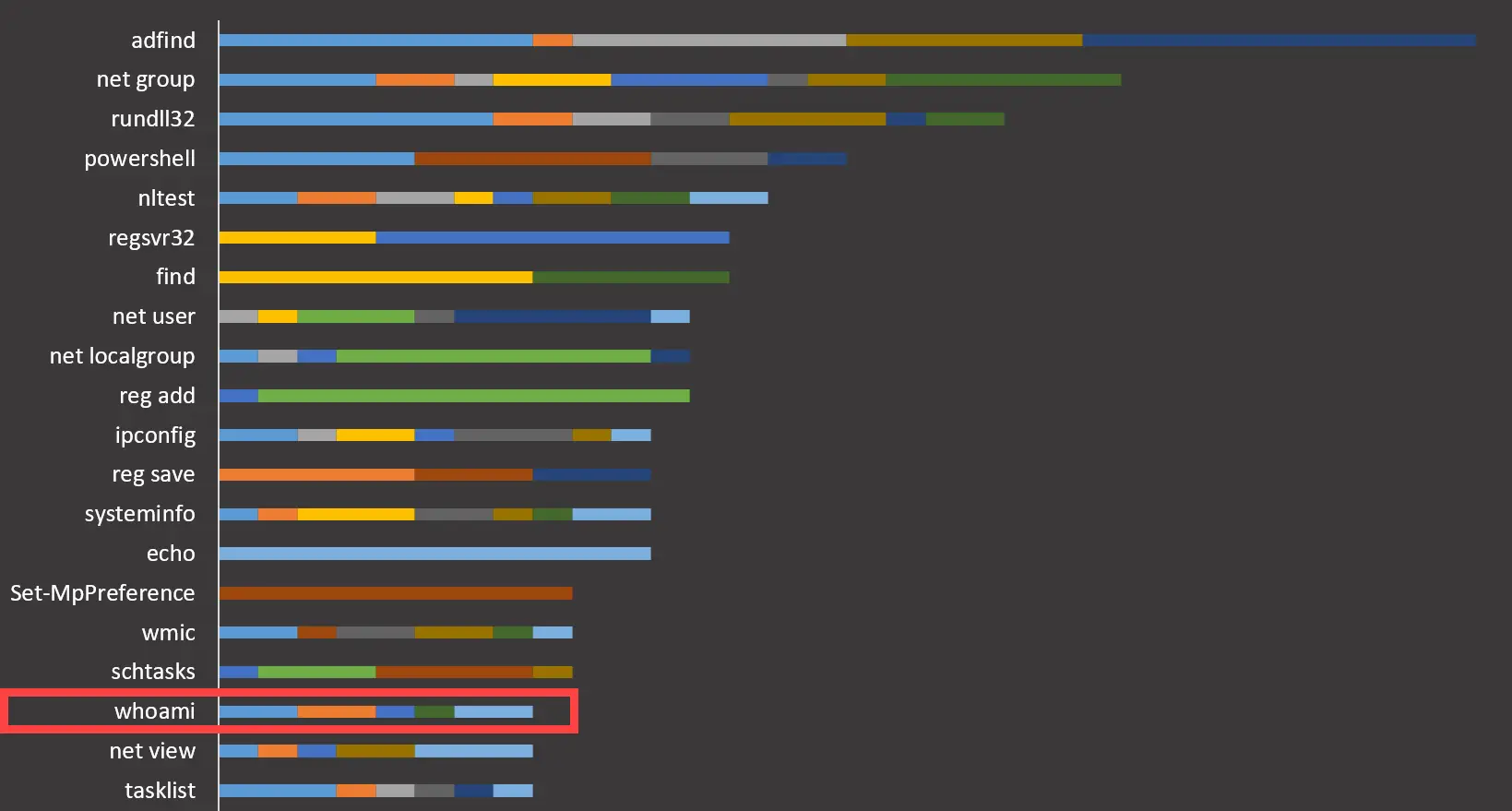
Across a number of DFIR reports, the whoami command isn't used a large number of times (the length of each bar), but it appears in a large number of reports (the individual segments in each bar).
The DFIR Report
thedfirreport.com
Real intrusions by real attackers.
Local admin escalation
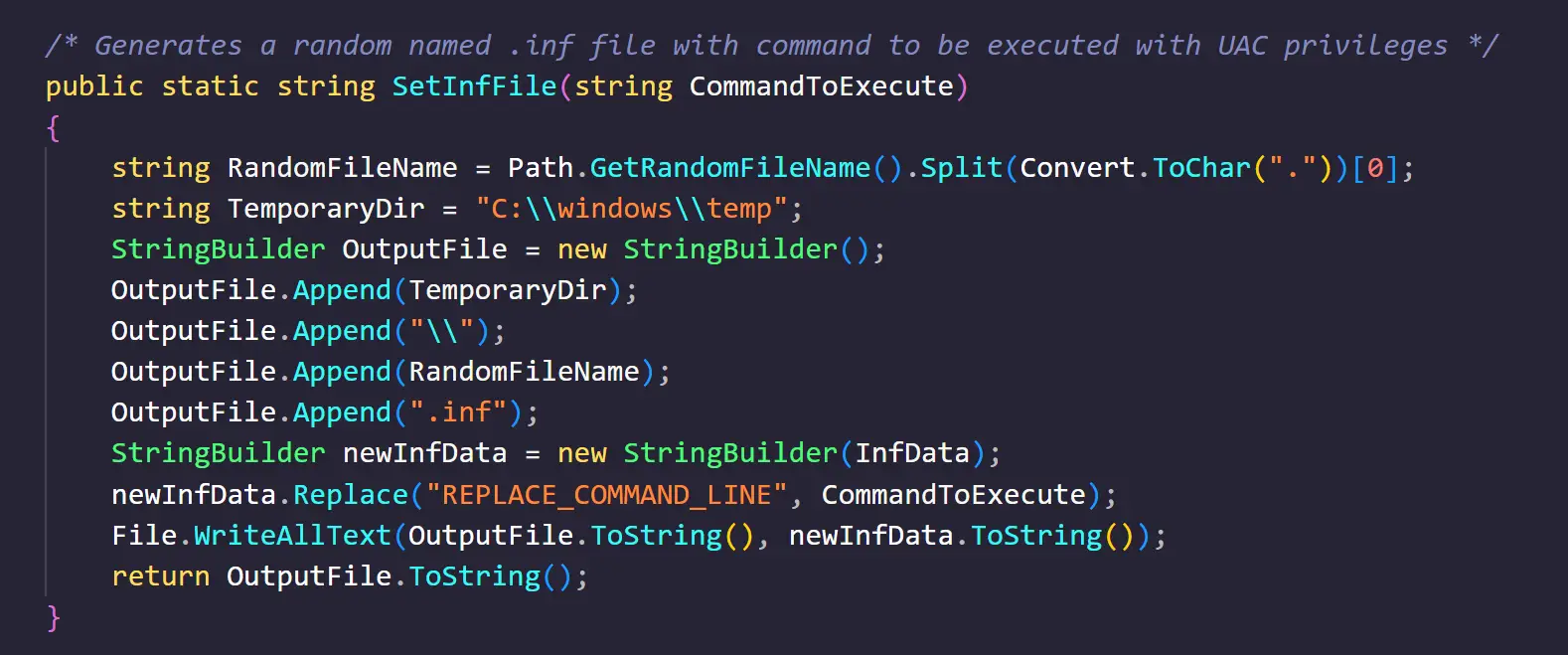
Since the account we have is in the local admins group, all we need for a high-privilege session is to get past User Account Control (UAC).
There are still a number of UAC bypasses; here we use a variant that abuses the Connection Manager Profile Installer (CMSTP). On success, we get another session calling back to Sliver with a High mandatory label, indicating local admin access and opening up further local escalation.
There are two closely linked detections:
- Server, Suspicious Commands, CMSTP. Detects use of the Microsoft Connection Manager Profile Installer (CMSTP), which can be used to bypass AppLocker as it's a signed Microsoft application.
- Attack, Possible UAC Bypass, cmstplua. Detects a possible UAC bypass based on abusing the CMSTPLUA COM interface.
Raw log: CMSTP execution
<System>
 <Provider Name='Microsoft-Windows-Sysmon'/>
 <EventID>1</EventID>
 <Task>Process Create (rule: ProcessCreate)</Task>
 <TimeCreated SystemTime='2023-01-18T08:35:46.801470200Z'/>
 <Computer>sv011-test.corp1.local</Computer>
</System>
<EventData>
 <Data Name='Image'>C:\Windows\System32\cmstp.exe</Data>
 <Data Name='Description'>Microsoft Connection Manager Profile Installer</Data>
 <Data Name='OriginalFileName'>CMSTP.EXE</Data>
 <Data Name='CommandLine'>"c:\windows\system32\cmstp.exe" /au C:\windows\temp\h5yaimw5.inf</Data>
 <Data Name='User'>CORP1\tboss</Data>
 <Data Name='IntegrityLevel'>Medium</Data>
 <Data Name='ParentImage'>C:\Windows\System32\WindowsPowerShell\v1.0\powershell.exe</Data>
 <Data Name='ParentCommandLine'>powershell c:\tempy\sliver_seamless.ps1</Data>
</EventData>
Raw log: UAC bypass
<System>
 <Provider Name='Microsoft-Windows-Sysmon'/>
 <EventID>1</EventID>
 <Task>Process Create (rule: ProcessCreate)</Task>
 <TimeCreated SystemTime='2023-01-18T08:35:47.165276900Z'/>
 <Computer>sv011-test.corp1.local</Computer>
</System>
<EventData>
 <Data Name='Image'>C:\Windows\System32\dllhost.exe</Data>
 <Data Name='Description'>COM Surrogate</Data>
 <Data Name='OriginalFileName'>dllhost.exe</Data>
 <Data Name='CommandLine'>C:\Windows\system32\DllHost.exe /Processid:{3e5fc7f9-9a51-4367-9063-a120244fbec7}</Data>
 <Data Name='User'>CORP1\tboss</Data>
 <Data Name='IntegrityLevel'>High</Data>
 <Data Name='ParentImage'>C:\Windows\System32\svchost.exe</Data>
 <Data Name='ParentCommandLine'>C:\Windows\system32\svchost.exe -k DcomLaunch</Data>
</EventData>
Detection logic
For this part of the chain we have two related detections. Other UAC bypass techniques exist in the wild, and the same testing process can be used to build detections for them. These rules are deceptively simple but took significant work to test and make accurate enough to use.
- Server, Suspicious Commands, CMSTP. We detect any use of cmstp.exe on the command line. It's infrequently used these days, and anything that does use it regularly can be excluded. In the command line we can see a randomly generated .inf file; we don't correlate on this as it changes easily, but anything run from the temp directory may make a better detection in your environment.
- Attack, Possible UAC Bypass, cmstplua. This looks for a very specific CLSID being called by dllhost.exe. That CLSID belongs to CMSTPLUA, the call in which the custom process is spawned while being auto-elevated to bypass UAC.
Detection logic: CMSTP execution
Log Source:    Windows Security OR Sysmon
Event ID:      4688 OR 1
Process Name:  EXACT MATCH cmstp.exe
Detection logic: UAC bypass
Log Source:        Windows Security OR Sysmon
Event ID:          4688 OR 1
CommandLine:       CONTAINS REGEX 3e5fc7f9
AND Process Name:  EXACT MATCH dllhost.exe
Reference
The reference below is what we used to build the DLL and link it to a PowerShell script that executes our Sliver beacon.
How to bypass UAC in newer Windows versions
0x00-0x00.github.io
Domain escalation
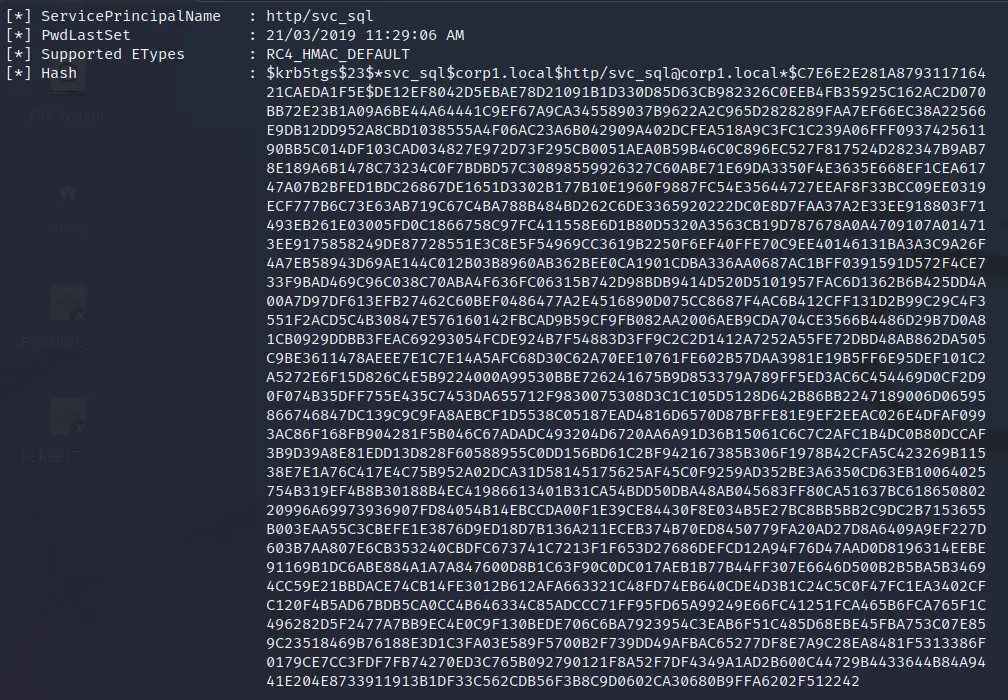
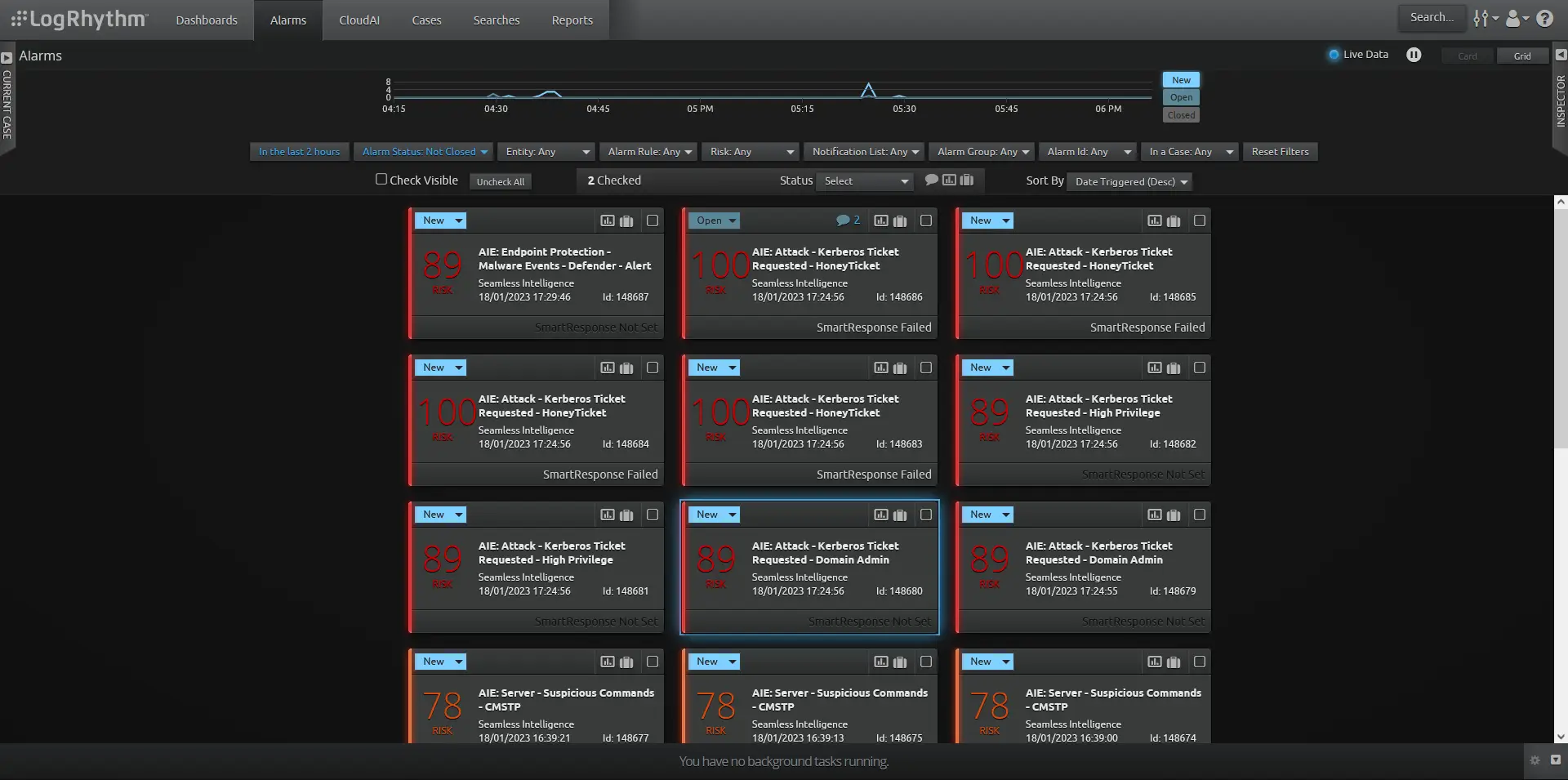
Kerberoasting is a common way to gain further privileges in the domain. Done carefully, it can evade most detections and products like Defender for Identity. But most tools go for gold and Kerberoast every account with a Service Principal Name (SPN). Done one at a time, it's still detectable through native Windows logging.
Here are three ways we attempt to detect Kerberoasting. More than this may trigger depending on the privileges of the targeted account; more detections means more confidence.
- Attack, Kerberos Ticket Requested, HoneyTicket. Create a honey account with an SPN and a strong password. If a tool Kerberoasts all users, this triggers.
- Attack, Kerberos Ticket Requested, High Privilege. Add high-privilege accounts here, such as SQL service accounts or any that are local admin across the server fleet. Running BloodHound gives a good idea of accounts on a path to Domain Admin that aren't direct DAs.
- Attack, Kerberos Ticket Requested, Domain Admin. Monitors any accounts that have Domain Admin rights and an SPN.
Raw log: honey ticket request
<Event xmlns='http://schemas.microsoft.com/win/2004/08/events/event'>
<System>
 <Provider Name='Microsoft-Windows-Security-Auditing'/>
 <EventID>4769</EventID>
 <Task>Kerberos Service Ticket Operations</Task>
 <TimeCreated SystemTime='2023-01-18T09:31:24.727321400Z'/>
 <Computer>SV001-DC.corp1.local</Computer>
</System>
<EventData>
A Kerberos service ticket was requested.

Account Information:
  Account Name:    tboss@CORP1.LOCAL
  Account Domain:  CORP1.LOCAL

Service Information:
  Service Name:    svc_http_admin
  Service ID:      CORP1\svc_http_admin

Network Information:
  Client Address:  ::ffff:192.168.3.15

Additional Information:
  Ticket Options:          0x800000
  Ticket Encryption Type:  0x17
  Failure Code:            0x0
</EventData>
</Event>
Detection logic
Once you've identified the accounts for each variant, the logic is simple: look for the SPN's service name on each account you want to monitor.
Detection logic: honey ticket
Log Source:    Windows Security
Event ID:      4769
Service Name:  EXACT MATCH svc_http_admin   (will differ in your environment)
Summary
Hopefully that gives a glimpse into how we test and what some of the logs look like. We'd planned to add more detections, but even the simple ones here took far longer than expected. If there are particular detections or logs from the full attack chain in Part 2 you'd like to see, reach out and we can add them here or do a Part 4. The main point of these articles is to highlight the effort involved in actually testing, logging and building detections. Too often it's not as simple as dropping a Sigma rule you found on GitHub into your SIEM and hoping for the best.